Overview
This case study focuses on the foundational structure of an ASP.NET Core Web API: how requests move through the application, how responsibilities are separated, and why this organisation scales better as the API grows.
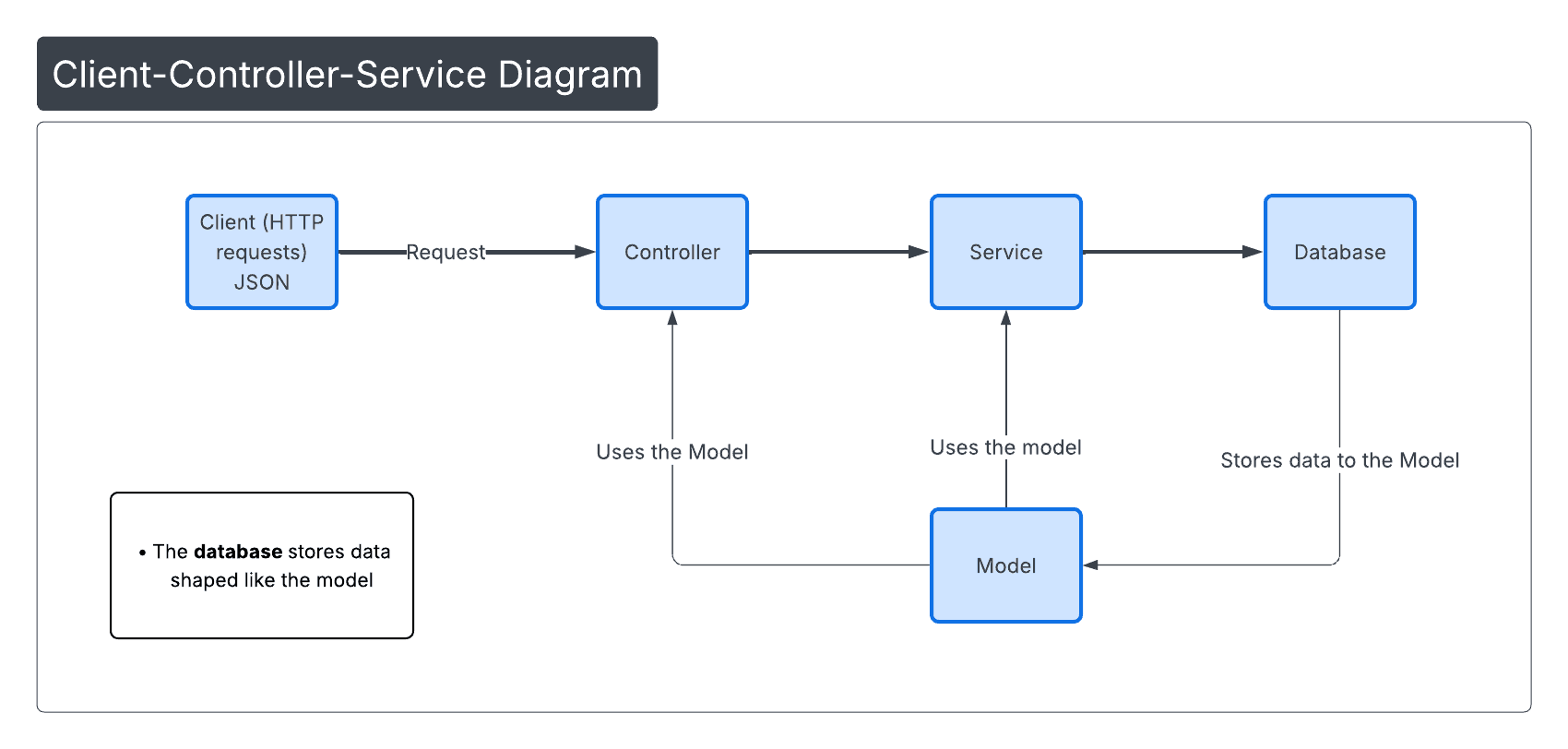
Request flow: client → controller → service → model/data → controller → response.
Project structure
Separation of concerns keeps the codebase predictable and easier to maintain.
/Controllers
    PostsController.cs

/Services
    PostsService.cs

/Models
    Post.cs

Program.cs
Layers and responsibilities
Controllers
A controller is the main entry point of an API. It handles HTTP requests, maps them to the correct actions, delegates business logic and CRUD operations to services, and returns appropriate HTTP responses to the client.
Dependencies flow from controller to service because controllers delegate business logic to services, not the other way around.
Services
A service encapsulates business logic and data access (such as CRUD operations), keeping controllers thin and improving scalability, testability, and separation of concerns.
Models
A model represents the structure of the data used by the application. It maps to database tables, but it is also used for input and output in the API.
Why this scales
This structure supports growth without turning controllers into large and unmaintainable classes:
- Swap in EF Core or a different persistence layer without changing HTTP endpoints.
- Add caching, background jobs, or validation rules inside services without breaking routing.
- Keep changes local: controllers stay thin, services evolve, models remain stable.
Fat controllers mix HTTP concerns with business logic, making the system harder to test, maintain, and scale, and increasing the likelihood of bugs.
Code samples
Below are simplified examples of the model, service, and controller layers used in this API.
Post model
C#{
public class Post
{
// mapping to database fields
public int UserId { get; set; }
public int Id { get; set; }
public string Title { get; set; } = string.Empty; // cannot be null
public string Body { get; set; } = string.Empty; // cannot be null
}
}Scalability of the Architecture:
When switching to EF Core (sql database), only the data access logic changes (inside the service or repository). Controllers and models typically remain unchanged.
Why string.Empty is used:
Using string.Empty instead of an empty string literal ("") makes the operation more decisive: the value is intentionally initialised and not null.
- Avoids
null-related bugs in APIs and database operations - Produces more predictable JSON serialisation
- Simplifies validation and business logic
- Aligns with common practices in modern .NET backend code
When null has a specific meaning, nullable reference types can be used instead (e.g. string?).
Posts service
C#public class PostsService
{
private static readonly List<Post> AllPosts = new();
public Task<Post?> GetPost(int id)
{
return Task.FromResult(AllPosts.FirstOrDefault( p => p.Id == id));
}
} // other CRUD operations omitted for brevityCRUD methods used in the Service layer
Create
Adds a new post to the data store. The service performs the operation without returning a value, while the controller returns 201 Created.
Read (all)
Returns all posts and simulates asynchronous database access. In a real implementation, this would query the database using EF Core.
Read (one)
Returns a nullable Post?. The service does not assign HTTP meaning; the controller decides whether to return 200 OK or 404 Not Found.
Update
Finds an existing post, updates its fields, and returns the updated entity or null if it does not exist.
Delete
Removes a post if it exists. The controller determines whether to return 204 No Content or 404 Not Found.
Posts controller (request flow)
C#[ApiController]
[Route("api/[controller]"]
public class PostsController : ControllerBase
{
private readonly PostsService _postsService;
public PostsController(PostsService postsService)
{
_postsService = postsService;
}
[HttpGet("{id}")]
public async Task<ActionResult<Post>> GetPost(int id)
{
var post = await _postsService.GetPost(id);
return post == null
? NotFound()
: Ok(post);
}
} // other CRUD operations omitted for brevity[ApiController] Attribute
Marks the class as a Web API controller and enables API-specific behaviour automatically.
- Triggers automatic model validation during model binding
- Returns 400 Bad Request with standardised JSON errors when input is invalid
- Prevents HTML error pages in API responses
- Reduces the need for manual validation logic
[Route] Attribute
Defines the base URL path for the controller using a placeholder token.
[controller]is replaced with the controller class name (withoutController)PostsControllermaps to/Posts- Plural resource naming follows REST best practice
Routes and HTTP verbs
Routing is composed by combining the controller route with HTTP verb attributes.
- The controller route defines the resource
- HTTP verb attributes define the operation
[HttpGet]→GET /Posts[HttpGet("{id}")]→GET /Posts/{id}
This layered approach allows the API to grow without increasing controller complexity or coupling business logic to HTTP concerns.
source: Web Api Development With ASP.NET Core 8